
Golden runs on AWS.
AI analytics built on AWS infrastructure, querying the Amazon Redshift data you already run the business on.
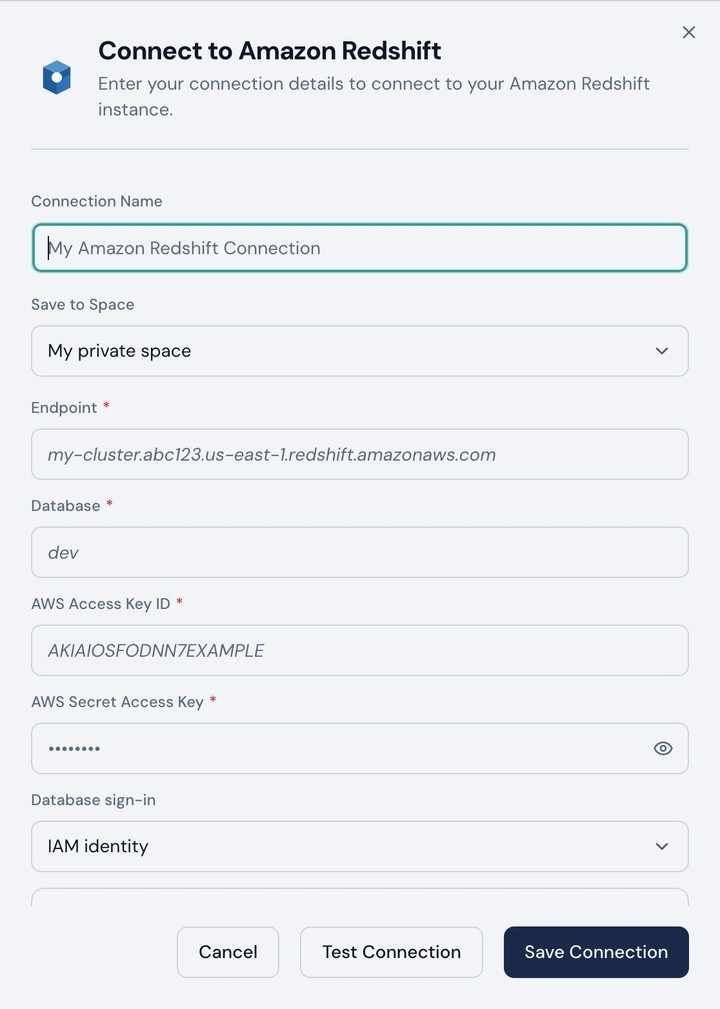
The same cloud your stack already runs in
Golden is hosted on AWS.
Compute, storage, and networking run in AWS regions, so Golden sits next to the systems your team already operates.
Every account is isolated.
Credentials and tokens are encrypted at rest with per-account KMS envelope encryption. One tenant's keys never open another's data.
Run analytics in the cloud your data already runs in
Golden runs on AWS
Golden's own services are built and operated on AWS. Your analytics workload and your data platform sit in the same cloud. No cross-cloud hop, and nothing new to learn for the team that already runs your AWS footprint.
Redshift live connectivity
Golden connects to your Redshift instance over TLS. Queries run under credentials your admin approves, so Redshift grants decide what comes back.
Queries run in place, no copies
Golden generates SQL, sends it to Redshift, and renders the result. Your cluster does the work and your logs keep the record. There is no extract to refresh and no second copy of warehouse data drifting out of date.
How Golden talks to Redshift
| Step | What happens |
|---|---|
| 1 · Connect | Your admin approves the Redshift connection and stays in control of it. Golden never self-provisions access. |
| 2 · Prepare | Clean, normalize, and reshape data in Golden. The steps compile into SQL that runs in Redshift, so no data is copied out. |
| 3 · Query | Golden generates SQL and sends it to your Redshift cluster. No extract or duplicate data store is required. |
| 4 · Enforce | Redshift executes the query under the connected identity, so existing grants and schema permissions apply. |
| 5 · Answer | Golden renders the result for analysis, dashboards, and stories. |
Why Golden on AWS is different
| Criterion | Traditional BI | Golden Analytics |
|---|---|---|
| Hosting | Runs wherever the vendor chose, often a different cloud from your data | Runs on AWS, the same cloud as your Redshift cluster |
| Redshift access | Often relies on extracts, copies, or refresh jobs | Queries Redshift live. No copied warehouse data |
| Identity | Often uses a shared service account plus app-level permissions | Queries under credentials your admin approves. Redshift grants decide access |
| Architecture | Dashboard-first product with AI added later | AI is built into discovery, prep, analysis, and storytelling |
| Time to first insight | Training and setup slow teams down | Start with a question, chart, dashboard, or story in minutes |
| Full workflow | Prep, analysis, and storytelling often live in different tools | Connect, discover, prepare, analyze, and communicate in one place |
Golden connects to the rest of your stack too

Snowflake
AI analytics on the Snowflake data, roles, and metrics you already run the business on. Reads your Semantic Views; OAuth means Snowflake roles decide access.

Databricks
AI analytics on the lakehouse data, Unity Catalog grants, and metrics you already run the business on. Every statement lands in your Query History.
Alteryx
Alteryx prepares the data. Golden makes it sing. Curated data that took hours to prepare, in front of every analyst and business user in minutes.
Golden × AWS
Where does Golden Analytics run?
Golden runs on AWS. Its compute, storage, and networking are built on AWS services, so the platform your analysts use and the warehouse it queries sit in the same cloud. For teams already standardized on AWS, that means one cloud provider and one set of security reviews, with no cross-cloud data path between Golden and your Redshift cluster.
Which AWS data sources does Golden support?
Amazon Redshift. Golden connects to Redshift and queries it live, generating SQL that your cluster executes. Golden also connects to other warehouses and to spreadsheets and files, so a team running Redshift alongside other systems can bring them all into the same analytics workflow. If you need an AWS source beyond Redshift, tell us which one and we will be straight with you about where it stands.
Does Golden move or copy data out of Redshift?
No. Golden does not extract, copy, or sync your Redshift data. The data stays in your cluster, and Golden returns only the results needed for a given analysis, dashboard, or story. There is no duplicate warehouse to maintain and no stale copy that drifts out of date, so every answer reflects what is in Redshift at the moment the question is asked.
How does Golden respect Redshift permissions and governance?
Golden queries Redshift under credentials your admin approves, so Redshift decides what comes back. Grants, schema permissions, and any row-level or column-level controls your team has configured stay fully in force, because the query is executed by Redshift rather than by a separate engine. Golden does not maintain a second permission model that could drift away from the one your admins already manage.
How is the Redshift connection authenticated and secured?
Your admin approves and configures the connection, and Golden never self-provisions access. Credentials are encrypted at rest with per-account KMS envelope encryption, so one tenant's keys never open another tenant's data. Connections travel over TLS, and access can be revoked on your side at any time by removing the grants or credentials Golden uses, which takes effect on the next query.
Does Golden change how Redshift costs and activity are audited?
Golden's queries run on your Redshift cluster, so Redshift compute does the work and your team keeps cost visibility and query history in the tools it already uses. Because the SQL is executed by Redshift, that activity appears in your own logs and monitoring rather than inside a vendor console you cannot inspect. No separate engine performs the computation outside your account.
How is Golden different from traditional BI tools running on AWS?
Traditional BI tools often rely on extracts, copies, or refresh jobs, run on infrastructure unrelated to your cloud, and query through a shared service account. Golden runs on AWS, queries Redshift live with no copied data, and executes under credentials your admin controls so Redshift grants decide access. Golden is also AI-native: AI is built into discovery, preparation, analysis, and storytelling rather than added as a separate chat panel.
Can Golden use Redshift alongside my other data sources?
Yes. In addition to Redshift, Golden connects to Snowflake, Databricks, BigQuery, Google Sheets, and files such as CSV, Parquet, and JSON. Teams can run one AI analytics workflow across all of these sources, with warehouse queries running in place rather than being duplicated into Golden. A dashboard can draw on Redshift and another source without either one being copied first.
Bring Golden to your AWS
Connect Redshift, keep governance where it already lives, and start building live dashboards on warehouse data.