Dashboard Navigation Tabs: Turn Dashboards Into a Control Center
Group related dashboard pages behind one shared header and tab strip, so every board keeps working as before while the experience feels like one focused data app.
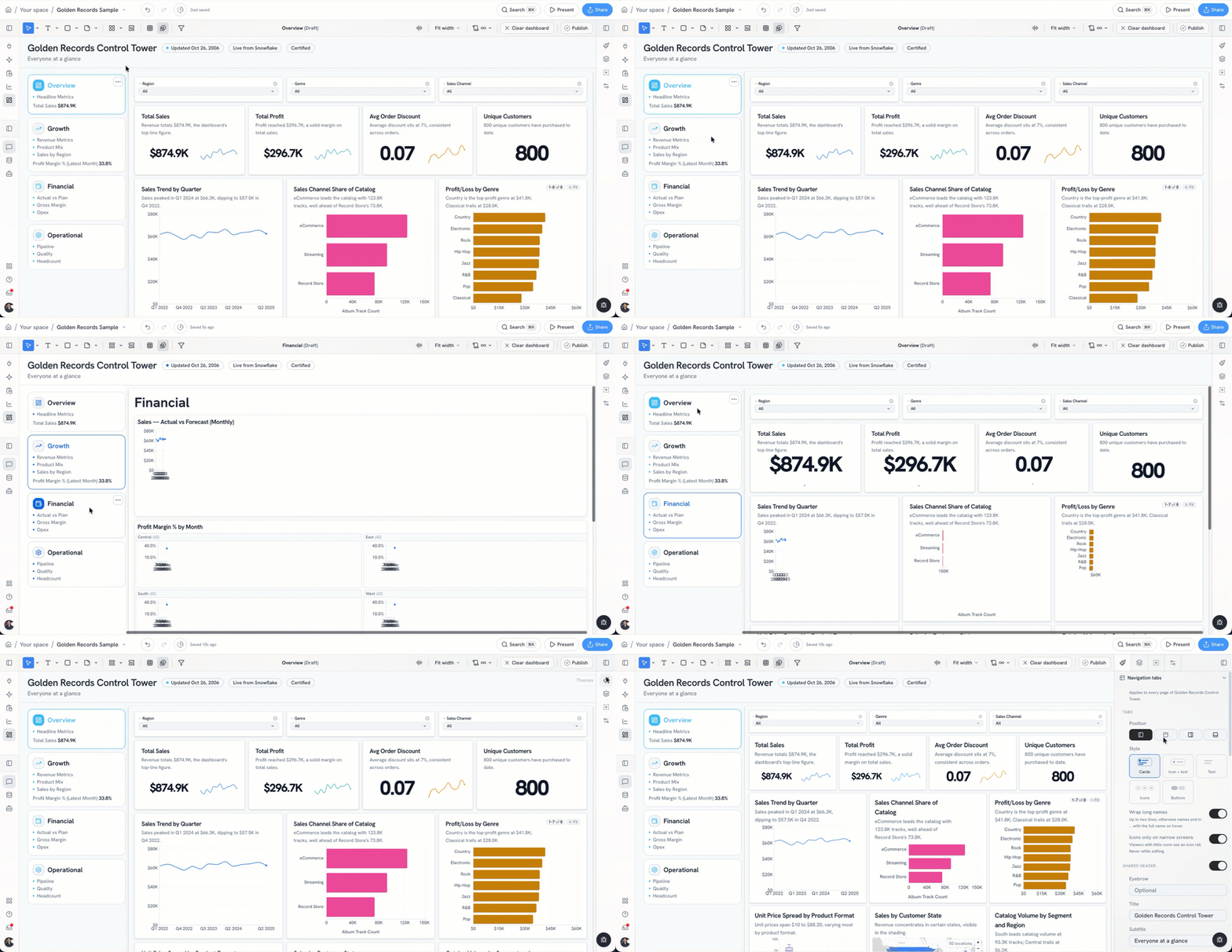
A dashboard can answer a question. A set of dashboards can run a business. The trouble is making that set feel coherent.
In older BI tools, polished multi-page navigation often meant workarounds: carefully aligned buttons, duplicated headers, hidden sheets, parameter tricks, or custom embedding code. The result could look convincing, but it was fragile. A renamed page or a new section could turn routine maintenance into another round of layout fixes.
Dashboard Navigation Tabs in Golden make the structure explicit.
One header, one tab strip, several dashboard pages
Navigation tabs group related dashboard pages behind one shared header and tab strip. Instead of presenting people with a collection of separate boards, you can give them one clear place to move between the views that belong together.
A revenue control center might include tabs for the executive overview, pipeline, retention, and forecasting. An operations workspace might move between capacity, service levels, and regional performance. The navigation stays consistent while the content changes with the job at hand.
The important part is what does not change. Each page remains an ordinary dashboard sheet. Its existing layout, filters, and AI generation continue to work exactly as they do on a standalone dashboard. Tabs organize the experience around those pages; they do not create a second kind of dashboard to maintain.
From a dashboard collection to a data control center
Good navigation changes how a dashboard feels. A single page is often something you visit, scan, and leave. A connected set of pages can become the place where a team monitors performance, investigates changes, and moves between related workflows.
That is the difference between a folder of dashboards and an app-like experience. The underlying analysis can stay familiar, while the presentation gives people a stronger sense of place and purpose.
Tabs are especially useful when:
- Several dashboards serve the same audience or business process.
- One overview needs clear paths into deeper operational views.
- Teams want consistent navigation without rebuilding their existing boards.
- A dashboard should feel more like a focused workspace than a standalone report.
Simple structure, less maintenance
The old workaround was to simulate navigation inside every page. That usually meant repeating the same controls, checking that links still worked, and keeping visual details aligned across the set.
With navigation tabs, the shared header and tab strip provide that structure once. Pages can keep doing what they already do well. When the dashboard set grows, the navigation can grow with it without turning each page into a custom project.
This is a small change with a practical effect: less time spent constructing the frame, and more time spent improving the data experience inside it.
Build the experience around the decision
Start with the way people move through the work. Put the most important overview first, group pages that belong to the same workflow, and use short tab names that make the next step obvious.
The goal is not to add navigation for its own sake. It is to make a related set of dashboards easier to understand and more useful as a whole.
Dashboard Navigation Tabs give Golden dashboards that shared structure while preserving each page as the dashboard it already is. The result is a cleaner path from insight to action, and a dashboard experience that feels much closer to a working data app.