You can check every number it gives you
You can trust a Golden number because you can check it. Editors can inspect and edit the SQL and calculations behind every chart. A change made by the AI and a change made by a click run through the same validated logic. Queries run live in your warehouse under your own permissions, and Golden doesn't train or fine-tune models on your data.
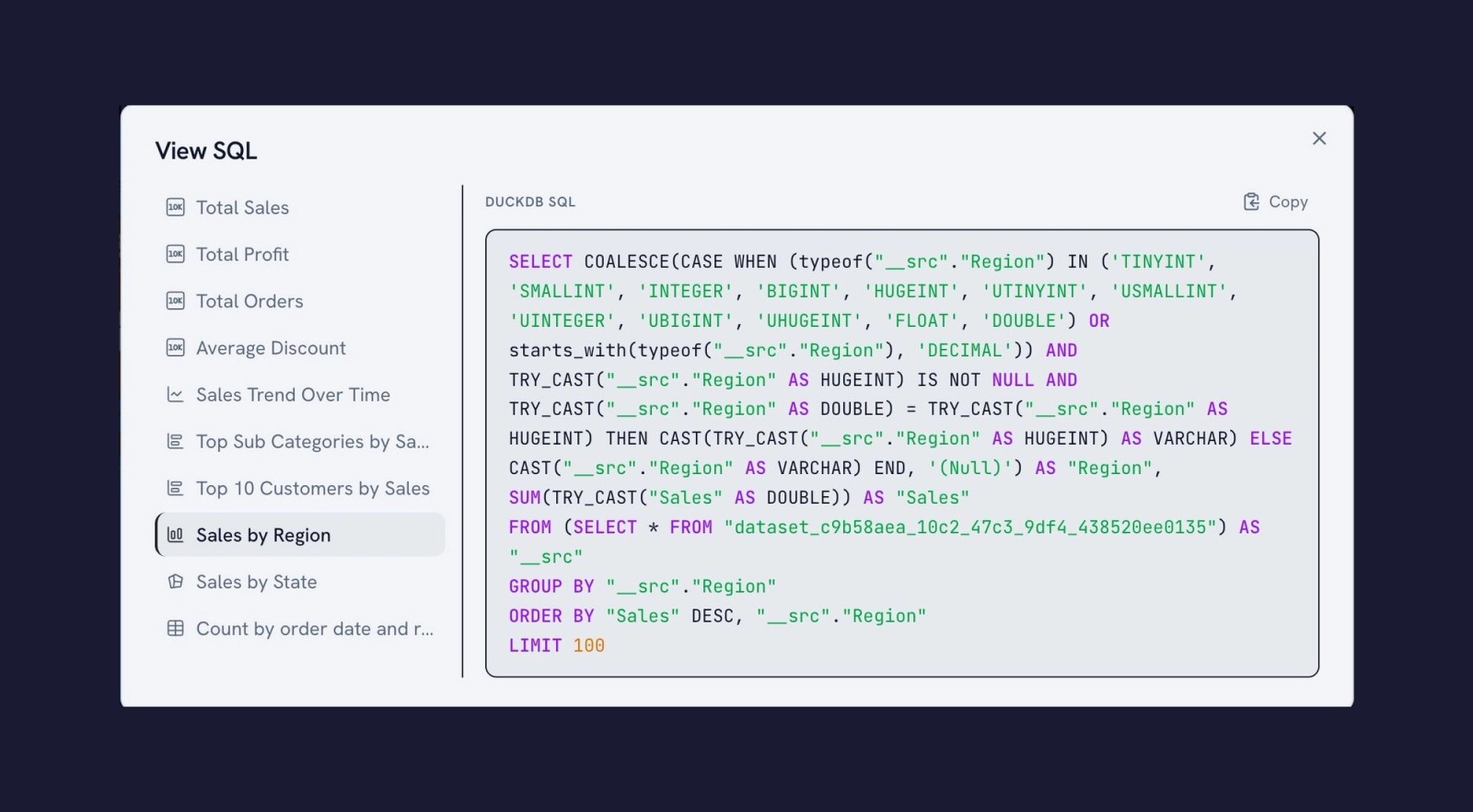
Five things that make Golden's answers checkable
- 01Every query and calculation is inspectable. Editors can open any chart or dashboard to see and edit the SQL and calculations that produced it. Viewers (consumers) see the results, not the SQL.
- 02One logic path, not two. A change you make by clicking and a change the AI makes run through the same validated logic, so the chart on screen is always the chart the query produced.
- 03Live data, not copies. Golden sends SQL to your warehouse and renders the result. There's no extract that may be out of date and no second copy of your data.
- 04Your permissions apply. On Snowflake, Databricks, BigQuery and Redshift, users query as themselves, and Golden uses the same row-level security approach on every warehouse, so roles, grants, row filters and masks decide what they see.
- 05Metrics stay defined once. Golden reads Snowflake Semantic Views and Unity Catalog metric views, so AI answers and dashboards use the definitions your data team approved.
Does Golden need a semantic layer?
No. Golden uses the semantic models you already have, and works without one. If you use Snowflake Semantic Views or Databricks Metric Views, Golden reads those definitions automatically and queries them directly, so metrics are calculated where your data team defined them, with nothing duplicated or rebuilt.
- Other semantic layers: Golden supports the Open Semantic Interchange (OSI) standard. If your tool can export to OSI, you can import those definitions into Golden.
- Context outside a semantic layer: business knowledge in documents, wikis or websites can be used too.
- No semantic layer at all: Golden can infer semantics from your data to get you started, and you review and refine those definitions as you go.
Either way, the AI doesn't invent SQL. Golden builds queries deterministically, grounded in your data and your semantic definitions. Read more in Semantics are essential. A semantic layer is optional.
What a checked definition looks like in Golden
Screenshots from a Golden dataset built on seven Snowflake tables from the Northwind sample.
- Step 1
Bring your own semantic model
Attach an OSI YAML file to a dataset. Its descriptions, synonyms and metrics apply to the dataset's columns, and your own edits always win.
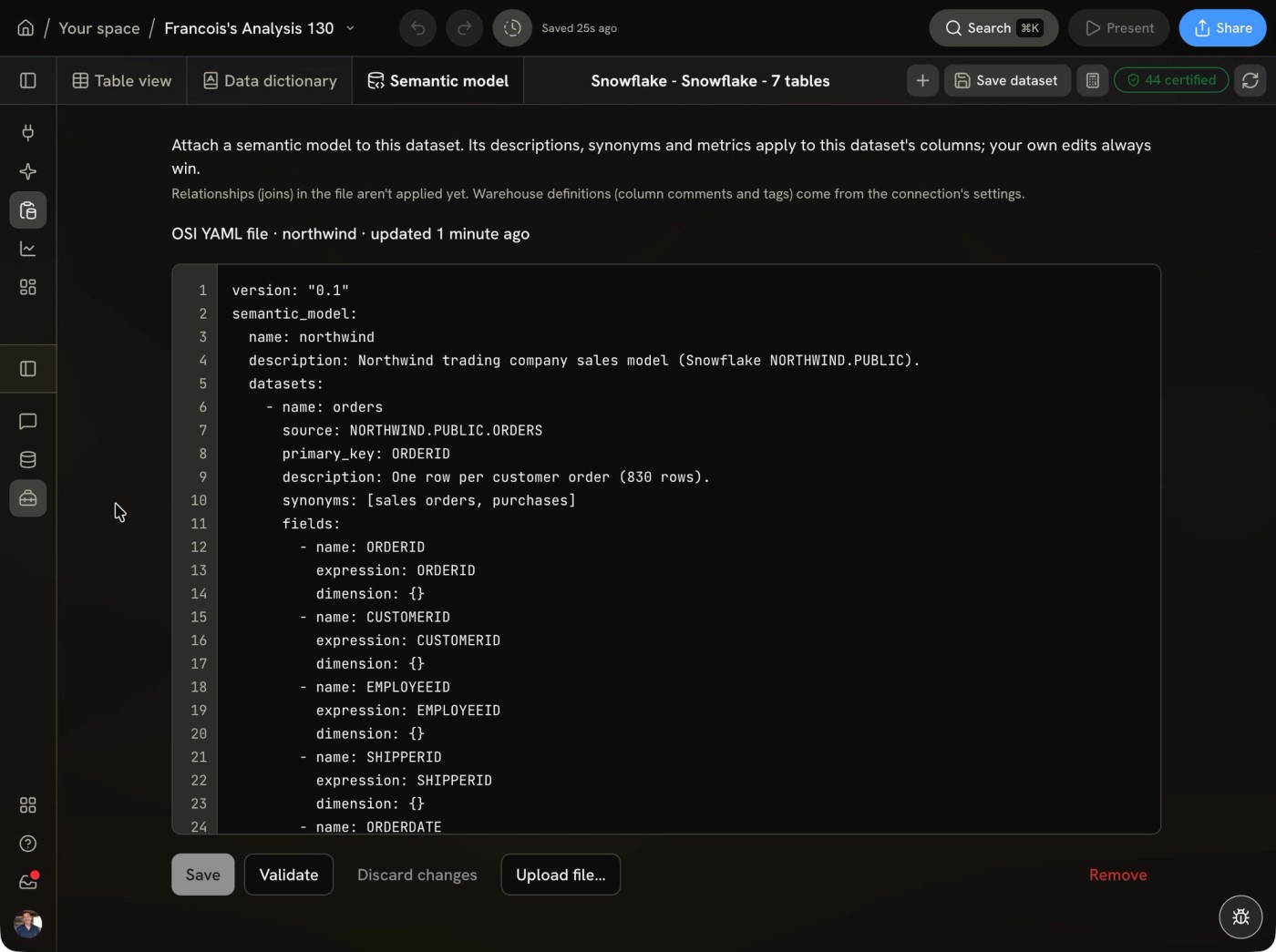
OSI YAMLValidate before saving - Step 2
See how tables relate
The data model shows how tables join, with each relationship listed so you can review, edit or add one.
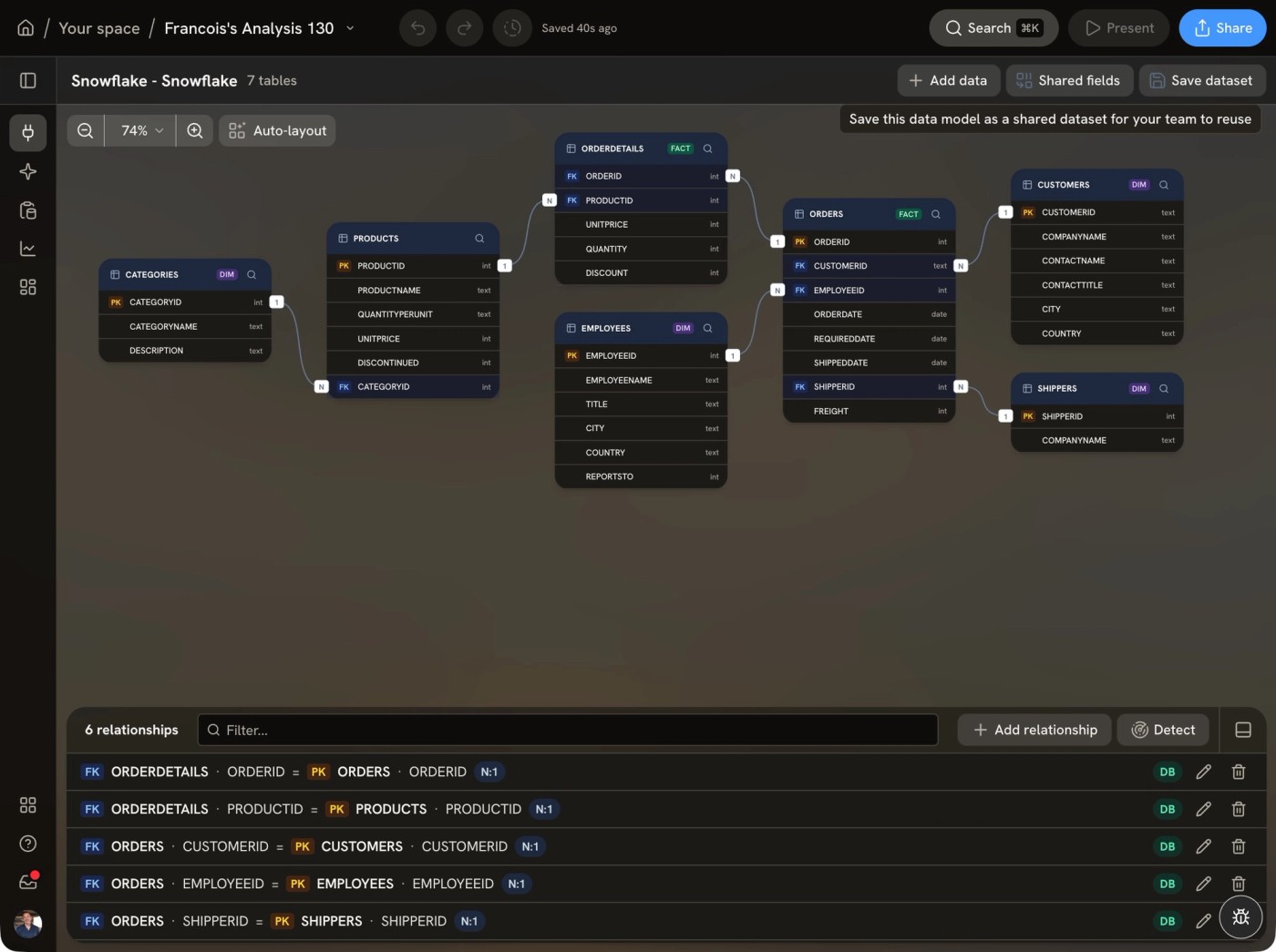
Joins you can review - Step 3
Know which fields to use
The data dictionary marks fields as Certified or Deprecated, so people pick the governed definition instead of a legacy one.
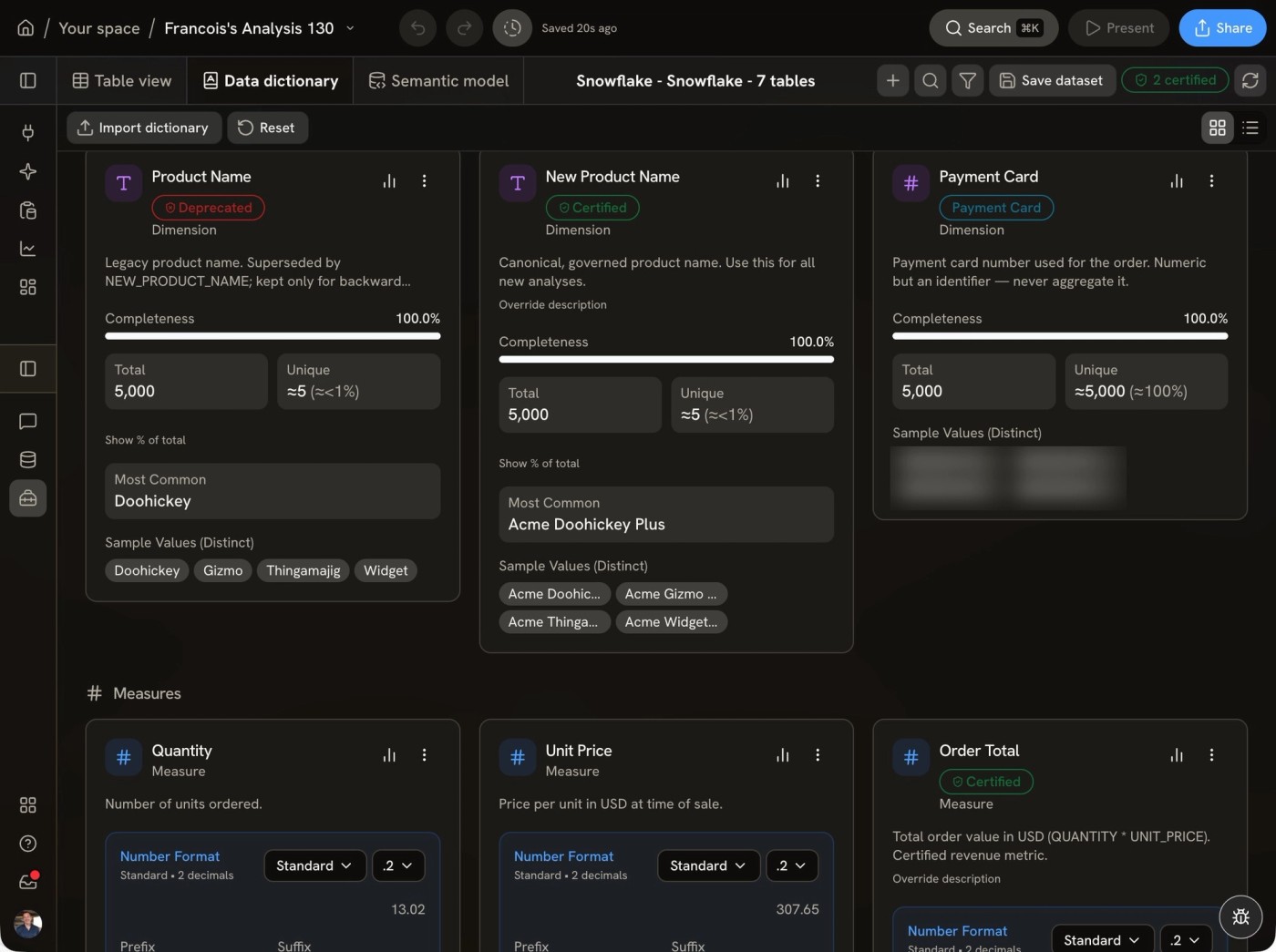
CertifiedDeprecated - Step 4
Check a metric while you analyze
Hover a certified metric to see where it comes from and how it's calculated, without leaving the chart.
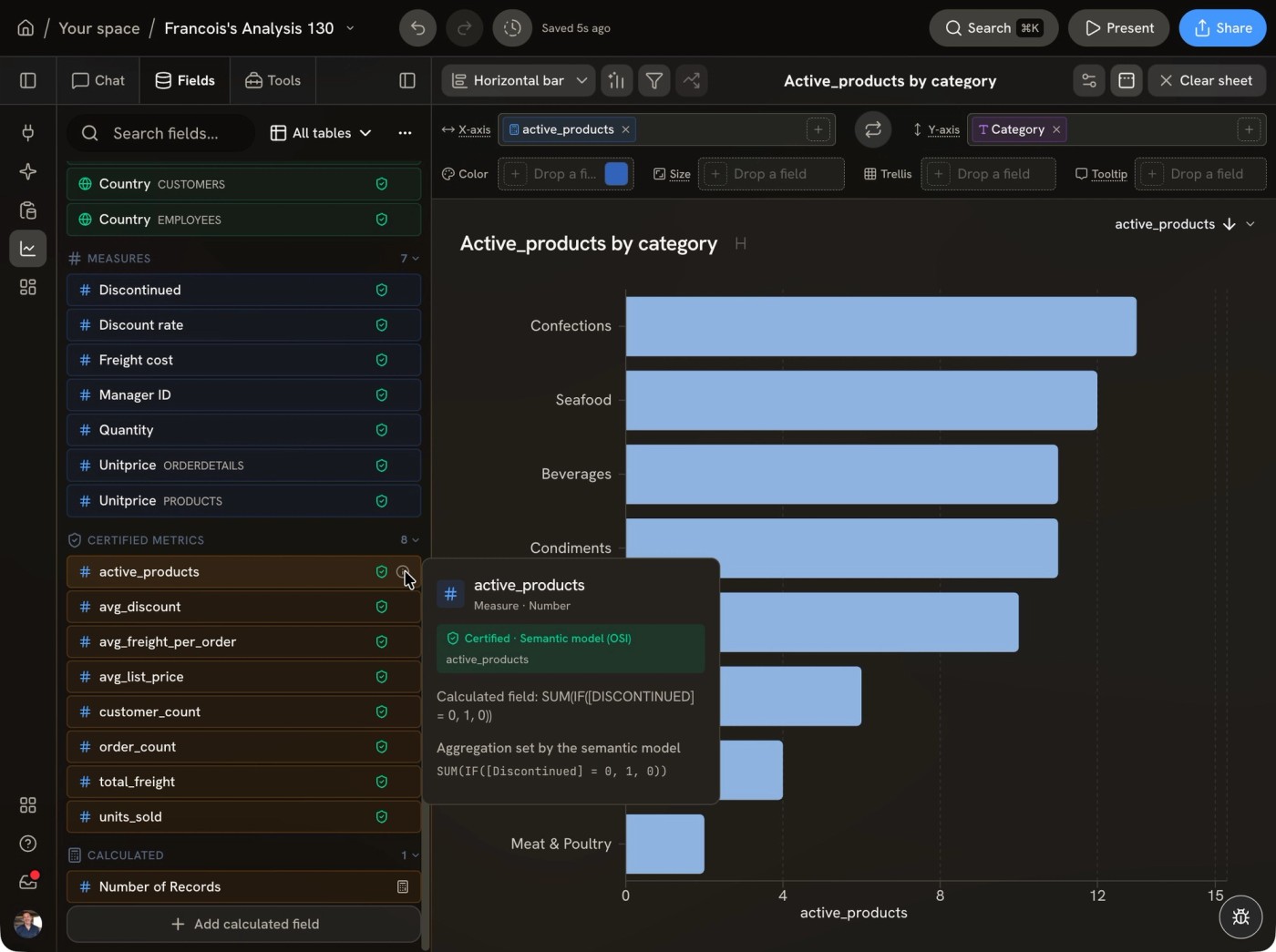
Certified · Semantic model (OSI)
What does Golden's AI see?
Golden sends the AI only the context a feature needs: table and column names, column statistics (min, max, mean, cardinality), small samples of values (typically up to 5 rows, with values truncated), aggregated chart results (up to 50 rows) and your prompt. Features that work on text by design, such as text analytics and AI enrichment, send the values of the specific cells you select for processing. Full tables are never sent. Golden does not train or fine-tune models on customer data. Golden uses several major AI models and picks the right one for each task, so you don't manage model keys.
How Golden protects sensitive data
On Snowflake and Databricks with per-user sign-in (OAuth), the warehouse enforces each person's masking and row policies on every query Golden runs, exports included, and Golden can't get around them. Salary, health or other personal data stays hidden from anyone your warehouse policies hide it from.
Per-user sign-in
- Use per-user sign-in for sensitive data. Each person connects with their own Snowflake or Databricks identity. On Snowflake, their default role, masking policies and row-access policies apply; on Databricks, their group grants and Unity Catalog column masks and row filters apply. Per-user OAuth is the default on Databricks.
- It fails closed. If someone hasn't authorized, the query is refused rather than falling back to a shared credential.
- No elevated roles. Golden never requests an elevated role at sign-in, so each person runs under their default Snowflake role. There's no per-user role picker, so check that default roles (Snowflake) or group grants (Databricks) are set correctly.
- Shared accounts see one view. On a shared Snowflake service account (key pair or PAT) or Databricks service principal, everyone sees what that account sees, so we don't recommend them for sensitive data. On Snowflake, an admin can pin a role on the connection; if that role can't be activated, the query fails instead of quietly using a broader one.
Admins, exports and custom SQL
- Admins can't see masked values. On a per-user connection, the warehouse masks the value before it reaches Golden, so an admin sees only what their own role allows. There's no "log in as user" or impersonation feature, nobody can use another person's warehouse token, and Golden's internal admin console has no access to customer warehouse data.
- Exports don't bypass masking. CSV, Excel and Google Sheets exports, and "view underlying rows," re-run the query live through the same connection and credential as the chart, so the warehouse masks the export the same way. With per-user connections, a person's data also stays out of shared caches, thumbnails and saved column stats.
- Custom SQL stays bounded. People with edit rights on a connection can write their own SQL. On per-user OAuth it's still limited by their own warehouse access; on a shared connection it runs as the service account.
Semantic models and Golden permissions
- Semantic views: Golden queries through Snowflake semantic views, and Snowflake security on the tables underneath still holds. Golden doesn't import or enforce access rules defined inside a semantic model.
- Golden's own controls: Spaces and roles in Golden decide who can reach which dataset and dashboard. Hiding a column in Golden only removes it from field lists; to restrict sensitive columns, use masking policies in your warehouse.
Security and compliance status
- SOC 2: Golden Analytics is pursuing SOC 2 Type II certification.
- Encryption: credentials, OAuth tokens and warehouse connection settings are encrypted with AES-256 (GCM) inside the application before they're stored, for every warehouse and app connector. All traffic uses HTTPS/TLS, with no unencrypted fallback. Each customer's data is isolated at the database level with row-level security, so one account can never reach another's resources. Secrets are never sent back to the browser: when you edit a connection, passwords, keys and tokens stay hidden. Every request to Golden is verified, and deactivated or deleted users are rejected immediately.
- Private connectivity: Golden supports PrivateLink for Snowflake and Databricks, so traffic between Golden and your warehouse can stay on a private network instead of the public internet.
- Access control: role-based access control, plus Spaces that control who can view or edit shared work.
- Enterprise: granular security controls. Enterprise SSO (SAML/OIDC) and audit logging are on the roadmap.
- Responsible disclosure: report vulnerabilities to security@goldenanalytics.com; see our security policy.
How to check an AI-generated number in Golden
- Open the chart and inspect the query and calculations behind it.
- Check the filters and the date range. They're part of the query, so what you see is what ran.
- Compare one total against a number you already trust, such as a finance report or a warehouse query.
- Edit anything that's off directly. You don't need to re-prompt.
- Share once it checks out. Before you share, Golden reviews visualizations for clarity and flags what could mislead.
Trust and data: common questions
Can I see the SQL behind an AI-generated chart in Golden?
Yes, if you're an editor. Editors can see and edit the SQL and calculations behind every chart and dashboard, whether built by clicking or by the AI. Both run through the same validated logic, so the chart on screen is always the chart the query produced. Viewers (consumers) see the results but not the SQL.
Does Golden train AI models on my data?
No. Golden does not train or fine-tune models on customer data. To answer accurately, the AI receives only the context a feature needs: table and column names, column statistics, small truncated samples of values (typically up to 5 rows), aggregated chart results (up to 50 rows) and your prompt. Text features such as AI enrichment send only the cells you select. Full tables are never sent.
Does Golden copy my warehouse data?
No, not for live warehouse connections. Golden sends queries to Snowflake, Databricks, BigQuery, Azure SQL Database or Redshift, the warehouse does the work, and Golden renders only the results needed for the analysis. Uploaded files are stored securely in your Golden account.
Does Golden respect my warehouse permissions?
Yes. On Snowflake, Databricks, BigQuery and Redshift, users query as themselves, and Golden applies the same row-level security approach on each, so roles, grants, row-level policies and masks decide what each person sees. Golden doesn't ask you to maintain a second permission model.
Does Golden require a semantic layer?
No. Golden reads Snowflake Semantic Views and Databricks Metric Views directly, imports other semantic layers through the Open Semantic Interchange (OSI) standard, can use business context from documents and wikis, and can infer semantics from your data if you don't have a semantic layer. You review and refine the definitions.
Does Golden respect Snowflake masking and column-level security?
Yes, with per-user connections. Each person signs in with their own Snowflake identity, so their role, masking policies and row-access policies apply to every query, including exports and "view underlying rows." Databricks works the same way with per-user OAuth. On a shared service account, everyone sees what that account sees.
Can a Golden admin see masked columns?
No, not on a per-user connection. Snowflake or Databricks masks the value before it reaches Golden, so an admin sees only what their own access allows. There's no impersonation feature, and Golden's internal admin console has no access to customer warehouse data. On a shared connection, admins see what the service account sees, like everyone else.
Does Golden enforce security defined in a semantic model?
Partly. Golden queries through Snowflake semantic views, and Snowflake security on the underlying tables still applies. Golden doesn't import or enforce access rules defined inside a semantic model, and hiding a column in Golden doesn't block access to the data, so use warehouse masking for sensitive columns.
Is Golden Analytics SOC 2 certified?
Golden Analytics is pursuing SOC 2 Type II certification. In the meantime, we encrypt credentials and connection settings at rest and all traffic in transit, isolate each customer's data, and use role-based access controls. Enterprise SSO and audit logging are on the roadmap. Contact us for our full security overview.
Check it on your own data
Connect a warehouse, ask a question you already know the answer to, and trace how Golden got there.