Introducing Paired Charts: Multiple Measures, One View
See multiple measures side by side without giving up clarity. Paired Charts share one category axis while giving each measure its own mark and scale.
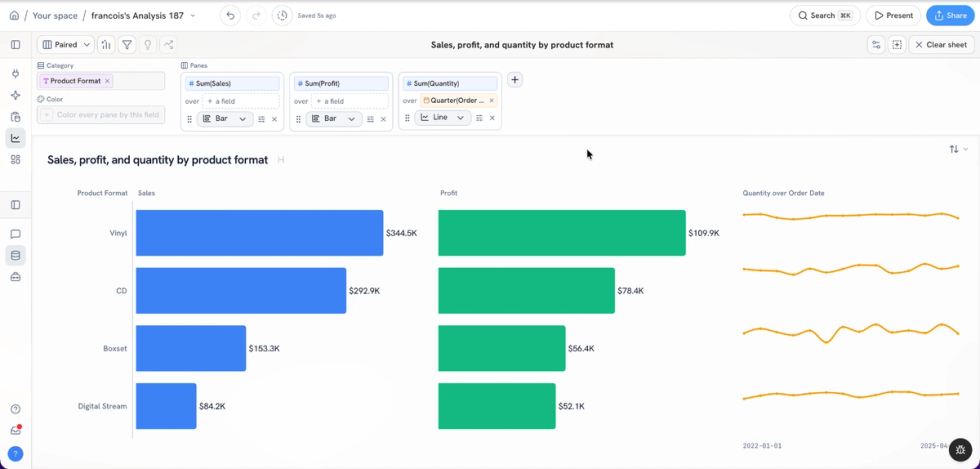
Business questions rarely fit neatly into a single measure. Revenue matters, but so do margin, volume, conversion, and change over time. The hard part is comparing them without forcing everything onto one crowded chart or building a separate view for every metric.
That is why we created Paired Charts in Golden.
What is a Paired Chart?
A Paired Chart is a first-class chart type that places several measures side by side as panes sharing one category axis. Each pane has its own measure, its own mark, and its own scale. One measure can appear as bars while another appears as a line or sparkline, and both remain aligned to the same categories.
That shared axis is what makes the view easy to read. Your eye can move across a customer, product, region, or time period and compare multiple measures without repeatedly reorienting. At the same time, independent scales keep values with different ranges from flattening or distorting one another.
More context, less chart clutter
Traditional analytics tools often make this kind of analysis harder than it should be. You may need to build multiple worksheets, synchronize axes, assemble a dashboard, or learn a specialized technique before you can answer a simple question.
Paired Charts make the pattern direct. Choose Paired Chart from the chart type selector, add the dimensions and measures you care about, and Golden organizes the measures into aligned panes. You can also ask for the view in chat, then adjust marks, fields, formatting, and layout with a few clicks.
The result combines the context of a dashboard with the focus of a single visualization.
When to use a Paired Chart
Paired Charts work especially well when you want to compare related measures across the same set of categories. For example:
- Revenue, margin, and order volume by product
- Pipeline, win rate, and average deal size by sales representative
- Traffic, conversion, and revenue by marketing channel
- Headcount, hiring, and attrition by department
- Current performance alongside a compact trend for each category
Because every pane can use the mark that best represents its measure, you do not have to compromise on a one-size-fits-all encoding. Bars can emphasize magnitude, lines can reveal movement, and sparklines can add trend context without taking over the page.
Designed for exploration
Paired Chart is not a workaround or a dashboard layout. It is a chart type of its own in Golden. That means it works naturally with the rest of the product: create it from the chart type selector or through chat, drag fields onto shelves, change marks, filter the data, and continue exploring.
We built it around a simple principle: powerful analysis should not require specialized expertise or a long tutorial. The chart should help you see more of the business question while keeping the mechanics out of the way.
Multiple measures. One shared view. Clear comparisons.
Try Paired Charts in Golden today.