
Golden vs Tableau
Tableau remains a powerful visual analytics platform. Golden is designed for a different starting point: connect data and get suggested questions, insights, and editable drafts immediately, then move between natural language and direct visual analysis as the question develops.
See Tableau alternativesCompare the path from a question to reusable analysis
Evaluate both products with the same dataset and business question. Measure time to the first useful finding, the effort required for follow-up analysis, how easily calculations can be checked, and what colleagues can do after the work is shared.
| Reason | Tableau | Golden Analytics |
|---|---|---|
| 01Discovery | A workbook usually begins with an analyst choosing fields, calculations, and views. | Golden profiles connected data and suggests questions, findings, and starter visualizations before you build. |
| 02Depth | Tableau offers extensive visual analysis, calculations, parameters, and extensions for experienced authors. | Golden combines built-in analytical patterns with a shelf-based builder and editable calculations for analyst-led investigation. |
| 03Control | Tableau Agent and Pulse add AI-assisted experiences to established Tableau workflows. | Ask for a draft, request a change, or edit the chart and calculation directly; each route updates the same analysis. |
| 04Collaboration | Creator, Explorer, and Viewer capabilities differ, so roles and licenses need to match how each person works. | Golden uses one seat model, with permissions controlling access rather than separate authoring and viewing products. |
| 05Output | Dashboards and stories are assembled and published through Tableau authoring workflows. | Exploration, dashboards, and narrative output stay in one workflow, so the deliverable develops with the analysis. |
| 06Pricing | Tableau publishes role-based pricing; Tableau+ pricing is available through sales. | $24 Team and $36 Enterprise per user per month when billed annually, with authoring and AI included. |
Reduce the manual work between a question and a dashboard
When a stakeholder needs an answer, building the report can become a separate project. Golden surfaces suggested questions and visualizations, lets you explore follow-ups in plain language, and carries the resulting charts into a dashboard. You can develop the analysis and its deliverable together. Ask Golden to generate the dashboard, then adjust the calculations, charts, and layout directly. AI handles the initial build while you review the results and shape the explanation for your audience.
How Golden gets there →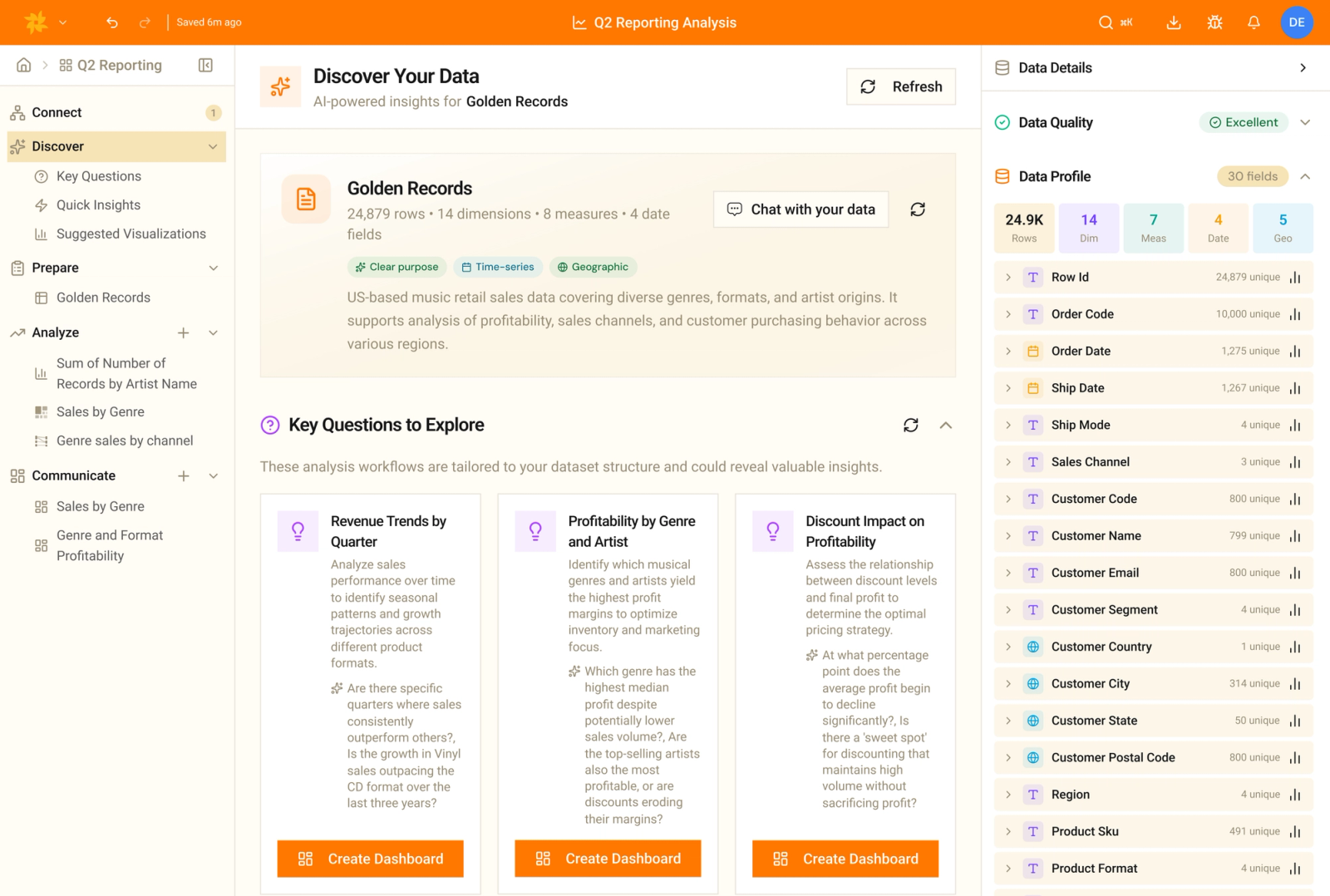
Answer common business questions without building every calculation from scratch
Questions about retention, top performers, and changes over time come up repeatedly. Golden supports these analytical patterns and provides natural-language help for more complex calculations, so you can work on the business question within the analysis you already have open.

In Golden: use cohort retention analysis to investigate whether customers return over time, with natural-language help for the calculations you need.
In Tableau: build cohort analyses using methods such as LOD expressions, with calculations tailored to your data and retention measure.

In Golden: use built-in top-N filters to identify leading products, customers, or regions and focus your analysis on the highest-ranked values.
In Tableau: use sets, parameters, and calculated fields for a top-N view with the remaining values grouped as “other.”

In Golden: apply a visual calculation to compare performance with a prior period, month, quarter, or year, helping you establish what changed.
In Tableau: use quick table calculations such as year-over-year growth, configuring the calculation and filter order for the comparison you need.
Verify the analysis before others rely on it
An AI-generated answer still needs your review, especially when colleagues will use it to make a decision. Golden lets you inspect generated calculations and trace numbers to their source, giving you the information you need to check the logic and explain the result.
Correct and refine the result directly
When a draft needs a different calculation or chart, you can make that change directly. Golden combines AI-assisted building with manual editing, so you can correct and refine the work without regenerating the entire dashboard.
Your data stays yours
We don't train models on customer data. Golden selects from multiple models for different tasks and works with schema, statistics, and a small data sample. Talk with us about your data-handling requirements as part of your evaluation.
Let colleagues build on shared work without buying an authoring upgrade
Tableau: match licenses to the work
Viewers interact with published views. Explorers can use web authoring; those with the publishing role and permissions can save changes and publish workbooks using existing sources. Creators can also connect to new data and publish new sources. The license and role need to match what each colleague will do.
Golden: one seat model, shared Spaces
A colleague who starts by viewing a report may later need to explore the data or contribute an analysis. Golden includes authoring in the same seat. Organize the work in Spaces and grant the appropriate permissions, so that change in responsibility does not require a separately priced authoring license.
What does "AI-native" actually mean?
There's a simple test. Ask what happens if you remove the AI. Take Pulse and Tableau Agent away and Tableau is still Tableau. Remove Golden's AI and the product no longer makes sense.

Golden: AI in the foundation
Whether you change a chart by clicking a menu or by typing "make this a line chart," both actions flow through the same validated logic. Ask for a dashboard and you get a finished, styled dashboard that's ready to share.
Tableau: AI on top
Pulse and Tableau Agent are real engineering. But the interaction model (building calcs and dragging fields into visuals) was designed long before AI showed up. The human is the only author. The AI advises, and you go click the buttons.
Simple, predictable pricing means more access to insights
Golden makes it easy, from our simple pricing model, no hidden fees or token add-ons, and no hassle managing users across difference license types.
| Per user, per month | Tableau Enterprise | Golden Team | Golden Enterprise |
|---|---|---|---|
| Full authoring (Creator) | $115 | $24 | $36 |
| Exploration (Explorer) | $70 | Included | Included |
| Consumption (Viewer) | $35 | Included | Included |
| AI agent | Extra, via Tableau+ (price not published) | Included | Included |
| License planning | Sort every user into the right tier | One seat does all four | One seat does all four |
Golden vs Tableau FAQs
What does "AI-native" really mean here?
It's a claim about architecture. A change you make by clicking and a change the AI makes both run through the same validated logic, and asking for a dashboard gets you a finished one rather than a wireframe.
We have years of Tableau workbooks. Is switching painful?
You don't rebuild everything on day one. Golden connects to the warehouse and models you already have, so you can run it beside Tableau, move the reports that matter most, and let the long tail age out.
Isn't Tableau's visualization still best in class?
Tableau set the bar for visual analytics, and it's genuinely good at it. The gap now is everywhere around the chart: how fast you build, how simple the common tasks are, how quickly the product improves, and what it costs.
How is Golden really a fifth of the price?
Tableau splits capability across Creator, Explorer and Viewer on Enterprise, then charges more for the AI agent through Tableau+. A Golden Team Creator is $24 and includes authoring, sharing, exploration, consumption and AI.
What about our data and which AI models you use?
Golden uses all the major models so the right one gets used for the job, and we don't train on any customer data. We work from schema, statistics, and some clever techniques to keep the experience fast and safe.

Bring one question. We'll show you the day-and-night difference.
Pick a report your team keeps rebuilding in Tableau. Ask Golden the same question in plain language.
Pricing, product names, and feature details reflect publicly reported information as of mid-2026 and are subject to change. Tableau pricing shown reflects Tableau Enterprise list rates. Tableau+ and Tableau Agent pricing is not publicly published. Last reviewed August 2026.