Calculation function reference
Every function you can use in a calculated field, grouped as Aggregate, Math, Logic, Text and Date, with its syntax and a working example.
This page lists every function the calculation editor accepts. Each one shows how to write it and an example you can paste straight into the Formula box.
When to use it
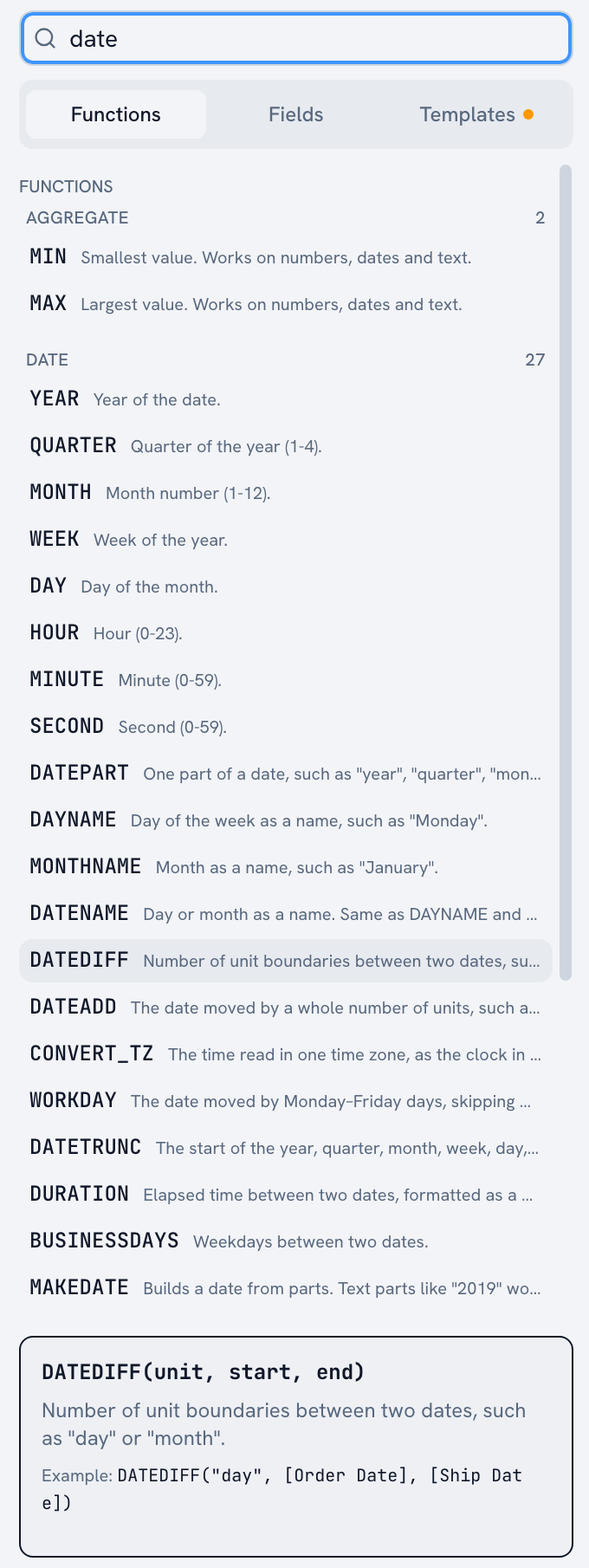
- You know what you want, not what it's called. Search "date" in the editor and every date function comes up with a one-line description.
- Checking an argument order.
DATEDIFFtakes the unit first,DATEADDtakes the amount second. The signatures below settle it. - Writing for a warehouse. A few functions aren't available on every data source; they're marked here.
Find a function in the editor
- Open the calculation editor (Fields tab, New calculated field).
- Click the Functions tab on the right, or type in Search functions and fields.
- Point at a function to see its syntax, description and example. Click it to add it to the formula.
While you type a function in the Formula box, its signature shows under the box so you can see which argument you're on.
How to write a formula
- Fields go in square brackets:
[Order Date]. - Text goes in double quotes:
"Late". - Arguments are separated by commas:
ROUND([Price], 2). - Operators:
+ - * /, comparisons= != > < >= <=, andAND,OR,NOT. NULLmeans blank.
Aggregate
Aggregates add rows up. A formula with one gives one value per group: per bar, per row of a table, per point.
| Function | What it does | Example |
|---|---|---|
SUM(value) | Total of the values. | SUM([Sales]) |
AVG(value) | Average of the values. AVERAGE works too. | AVG([Discount]) |
MEDIAN(value) | Middle value. | MEDIAN([Order Value]) |
MIN(value) | Smallest value. Works on numbers, dates and text. | MIN([Order Date]) |
MAX(value) | Largest value. Works on numbers, dates and text. | MAX([Order Date]) |
COUNT(value) | Number of non-blank values. | COUNT([Order ID]) |
COUNTD(value) | Number of distinct values. | COUNTD([Customer ID]) |
FOREACH(group, aggregate) | The aggregate for each group, repeated on every row of that group. A field built on it can be grouped by. | FOREACH([Customer], SUM([Sales])) |
PERCENT_RANK(aggregate) | Percentile rank from 0 to 1 across the chart's groups. Ties share their lowest rank. Keep the entity on the chart. | PERCENT_RANK(SUM([Sales])) |
Math
| Function | What it does | Example |
|---|---|---|
SAFE_DIVIDE(numerator, denominator) | Divides, giving blank instead of an error when the denominator is 0. | SAFE_DIVIDE([Profit], [Sales]) |
ROUND(value, decimals?) | Rounds to the given decimals (0 by default). | ROUND([Price], 2) |
FLOOR(value) | Rounds down to a whole number. | FLOOR([Age] / 10) * 10 |
CEILING(value) | Rounds up to a whole number. | CEILING([Quantity] / 12) |
ABS(value) | Absolute value. | ABS([Variance]) |
SQRT(value) | Square root. | SQRT([Area]) |
POWER(value, exponent) | Raises a value to a power. | POWER(1 + [Rate], [Years]) |
MOD(value, divisor) | Remainder after division. | MOD([Row ID], 2) |
LOG(value) | Logarithm of a positive number. | LOG([Revenue]) |
DISTANCE(lat, lon, targetLat, targetLon, unit?) | Great-circle distance to a point or another pair of coordinates. Unit is "miles" (default), "kilometers" or "meters". | DISTANCE([Lat], [Lon], 41.88, -87.63) |
Logic
| Function | What it does | Example |
|---|---|---|
IF(condition, then, else) | One value when the condition holds, another when it doesn't. | IF([Profit] > 0, "Profitable", "Loss") |
CASE(value, match1, result1, ..., default?) | Matches a value against a list and returns the paired result. | CASE([Region], "East", 1, "West", 2, 0) |
COALESCE(value1, value2, ...) | First value that isn't blank. Use it to fill blanks. | COALESCE([Discount], 0) |
NULLIF(value, other) | Blank when the two are equal, otherwise the first value. | NULLIF([Status], "Unknown") |
Nest IF for more than two outcomes: IF([Sales] >= 500, "Large", IF([Sales] >= 100, "Medium", "Small")).
Text
| Function | What it does | Example |
|---|---|---|
CONCAT(text1, text2, ...) | Joins text together. | CONCAT([City], ", ", [State]) |
CONTAINS(text, search) | True when the text includes the search text. | CONTAINS([Product Name], "Pro") |
LEFT(text, count) | First characters. | LEFT([Zip], 3) |
RIGHT(text, count) | Last characters. | RIGHT([SKU], 4) |
LEN(text) | Number of characters. | LEN([Comment]) |
TRIM(text) | Removes spaces from both ends. | TRIM([Name]) |
UPPER(text) | Uppercase. | UPPER([Code]) |
LOWER(text) | Lowercase. | LOWER([Email]) |
SPLIT(text, "delimiter", n) | The nth piece, counting from 1. Delimiter and n must be typed in, not fields. Not on every data source. | SPLIT([Email], "@", 2) |
REGEXEXTRACT(text, "pattern", n) | The nth capture group of the first regular-expression match. Not on every data source. | REGEXEXTRACT([Zip], "([0-9]{5})", 1) |
STR(value) | Any value as text, such as a number to join with CONCAT. | CONCAT("W", STR([Week])) |
Date
Parts of a date
| Function | What it does | Example |
|---|---|---|
YEAR(date) | Year. | YEAR([Order Date]) |
QUARTER(date) | Quarter (1–4). | QUARTER([Order Date]) |
MONTH(date) | Month number (1–12). | MONTH([Order Date]) |
WEEK(date) | Week of the year. | WEEK([Order Date]) |
DAY(date) | Day of the month. | DAY([Order Date]) |
HOUR(datetime) | Hour (0–23). | HOUR([Created At]) |
MINUTE(datetime) | Minute (0–59). | MINUTE([Created At]) |
SECOND(datetime) | Second (0–59). | SECOND([Created At]) |
DAYNAME(date) | Day as a name, like "Monday". | DAYNAME([Order Date]) |
MONTHNAME(date) | Month as a name, like "January". | MONTHNAME([Order Date]) |
DATENAME("weekday" or "month", date) | Same as DAYNAME and MONTHNAME. | DATENAME("month", [Order Date]) |
DATEPART(part, date) | One part of a date (see below). | DATEPART("weekday", [Order Date]) |
DATEPART takes "year", "quarter", "month", "dayofyear", "isoweek", "isoyear", "isoweekday" (Monday is 1), "weekday" (1–7 from your account's week start), and "fiscalyear" and "fiscalquarter", which follow your account's fiscal year start. A fiscal year starting July 2026 is 2027.
Time between dates
| Function | What it does | Example |
|---|---|---|
DATEDIFF(unit, start, end) | Number of unit boundaries between two dates, such as "day" or "month". | DATEDIFF("day", [Order Date], [Ship Date]) |
DURATION(start, end, unit?, abs?) | Elapsed time, formatted as a duration. Pass true for always-positive. | DURATION([Order Date], [Ship Date], "days") |
BUSINESSDAYS(start, end, abs?) | Weekdays between two dates. | BUSINESSDAYS([Order Date], [Ship Date]) |
Move or round a date
| Function | What it does | Example |
|---|---|---|
DATEADD(unit, amount, date) | Moves a date by whole units. A negative amount moves it back. | DATEADD("hour", -7, [Timestamp]) |
WORKDAY(date, days) | Moves a date by Monday–Friday days, skipping weekends (not holidays). | WORKDAY([Order Date], 3) |
DATETRUNC(unit, date, weekStart?) | Start of the year, quarter, month, week, day, hour, minute or second the date falls in. | DATETRUNC("month", [Signup Date]) |
CONVERT_TZ(time, from zone?, to zone?) | A time read in one zone, as the clock in another. Follows daylight saving. Without a target, converts into your account's time zone. | CONVERT_TZ([Event Time], "UTC", "America/Los_Angeles") |
Build or read a date
| Function | What it does | Example |
|---|---|---|
MAKEDATE(year, month, day) | Builds a date from parts. Text parts like "2019" work. | MAKEDATE([Year], 1, 1) |
MAKEDATETIME(date, time) | Joins a date and a 24-hour time, or builds a timestamp from 6 parts. | MAKEDATETIME([Order Date], [Order Time]) |
MAKETIME(hour, minute, second) | Builds a time of day. Read it back with HOUR, MINUTE and SECOND. | MAKETIME(8, 30, 0) |
DATE(text or number, "format"?) | Reads text or a number as a date. Name the format for anything unusual, like "MM/DD/YYYY" or "YYYYMMDD". | DATE([Order Text], "MM/DD/YYYY") |
DATEFORMAT(date, "format") | Writes a date as text, like "YYYY-MM-DD" or "MMM YYYY". | CONCAT("Week of ", DATEFORMAT([Order Date], "YYYY-MM-DD")) |
TODAY() | Current date. | DATEDIFF("day", [Order Date], TODAY()) |
NOW() | Current date and time. | NOW() |
Look up a date range
RANGE_LOOKUP(date, "table", "start column", "end column", "return column") returns a column from another table's row whose start-to-end range holds the date, like the season or promotion an order fell in. It works on uploaded files and Snowflake.
RANGE_LOOKUP([Order Date], "Seasons", "start", "end", "name")Do it from chat
You don't need to remember any of this. Describe the result and the analyst picks the functions:
Add a field with the fiscal quarter of each order, like FY2025 Q3Add a field for each customer's total sales across all their ordersFAQ
What's the difference between DATEDIFF and DURATION? DATEDIFF counts boundaries crossed and returns a plain number. DURATION measures elapsed time and formats the result as a duration, like "4 days".
Why is SPLIT not working on my data? SPLIT and REGEXEXTRACT aren't available on every data source. On an uploaded file they always work.
Can I nest functions? Yes, as deep as you need: ROUND(SAFE_DIVIDE(SUM([Profit]), SUM([Sales])), 2).
Are fiscal years supported? Yes. DATEPART("fiscalyear", ...) and DATEPART("fiscalquarter", ...) follow the fiscal year start set for your account.